
SMS Composer for SmartWatch5.8 - Get APK
You'll be able to download in few seconds.
Publisher Description
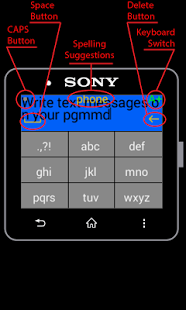
Write and send SMS from your Sony SmartWatch.
Compose message using T9 keyboard. Send to an existing contact in your address book, or directly input the recipient's number.
Type the message directly, or choose from the templates which you can define in the app settings. Use codes such as %name, which will be replaced with the recipient's name upon sending ;-)
NEW: Check out the new Messaging Hub app, which enables replying to Email, SMS, Whatsapp, Skype, Viber, Hangouts, FB Messenger, Telegram, etc.: https://play.google.com/store/apps/details?id=eir.replier
UPDATE, v5.8:
If the app is performing slowly, TURN SPELLING SUGGESTIONS OFF IN THE SETTINGS.
Spelling suggestions are currently available for these languages:
* English
* Russian
* Italian
* German
* French
* Portuguese
* Greek
* Serbian
* Croatian
* Slovenian
The spelling suggestions need to be enabled in the app settings (on your phone/tablet) first. Use the keyboard switch (top right) to select the keyboard and turn spelling suggestions on / off.
DELETE a char via the <- button on the right.
Insert SPACE via the _ button on the left.
SWIPE UP/DOWN to scroll through the text suggestions.
Video demo: www.youtube.com/watch?v=6oXgRGLCWkA
INSTRUCTIONS (for SmartWatch2 and v5 see the note above):
========================================================
Step 1.A: Write the message
-------------------------------------------------------------------------------
Swipe RIGHT to input SPACE
Swipe LEFT to DELETE
Swipe UP to enter CAPS
Swipe DOWN to switch between keyboards.
When done writing, LONG TAP the blue area to confirm the message contents.
Step 1.B: Choose from a template
----------------------------------------------------------------------------------
LONG TAP the "Use predefined message?"
= Template list mode =
Swipe UP and DOWN to find the template you want to use.
LONG TAP the template to preview it (i.e. switch to Template preview mode)
LONG TAP the blue area on the left to directly select the template, without previewing.
Swipe LEFT to switch to Template preview mode
= Template preview mode =
Swipe UP and DOWN to find the template you want to use.
LONG TAP the blue area with the text "Use this one" to select the template.
LONG TAP on the gray area with the text "Cancel" to return to Step 1.A
Swipe RIGHT to switch to Template list mode
Step 2: Select the recipient from your contact list, or directly enter the number
--------------------------------------------------------------------------------------------------------------------------------
Swipe LEFT: to delete the last typed number or character
Swipe RIGHT: to delete all
Swipe UP / DOWN: to switch to T9 search
Swipe UP / DOWN: to list through the search results in T9 mode
LONG TAP on the green area to confirm the selection / input.
LiveWare™ extension for SmartWatch
Smart Connect extension for SmartWatch 2
About SMS Composer for SmartWatch
The company that develops SMS Composer for SmartWatch is Eir3 Apps. The latest version released by its developer is 5.8.
To install SMS Composer for SmartWatch on your Android device, just click the green Continue To App button above to start the installation process. The app is listed on our website since 2013-12-04 and was downloaded 0 times. We have already checked if the download link is safe, however for your own protection we recommend that you scan the downloaded app with your antivirus. Your antivirus may detect the SMS Composer for SmartWatch as malware as malware if the download link to eir.writer.sms is broken.
How to install SMS Composer for SmartWatch on your Android device:
- Click on the Continue To App button on our website. This will redirect you to Google Play.
- Once the SMS Composer for SmartWatch is shown in the Google Play listing of your Android device, you can start its download and installation. Tap on the Install button located below the search bar and to the right of the app icon.
- A pop-up window with the permissions required by SMS Composer for SmartWatch will be shown. Click on Accept to continue the process.
- SMS Composer for SmartWatch will be downloaded onto your device, displaying a progress. Once the download completes, the installation will start and you'll get a notification after the installation is finished.
Program Details
System requirements
Download information
Pricing
Version History
version 5.8
posted on 2013-12-04
v.5.8,* Option to turn spelling suggestions off (for better performance),* Spelling suggestions for Portuguese, Greek, Serbian, Croatian and Slovenian.,v.5.7,* Spelling suggestions for Russian, French and German.,v.5.6,* Bug fixes,* Optimization,v.5.5,* Italian spelling,* Emoticons
version 3.2
posted on 2013-04-22
Several fixes and updates
Disclaimer
External Download
We do not host SMS Composer for SmartWatch on our servers. We did not scan it for viruses, adware, spyware or other type of malware. This app is hosted by Galad and passed their terms and conditions to be listed there. We recommend caution when installing it.
The APK Download link for SMS Composer for SmartWatch is provided to you by apps112.com without any warranties, representations or guarantees of any kind, so access it at your own risk.
If you have questions regarding this particular app contact the publisher directly. For questions about the functionalities of apps112.com contact us.
